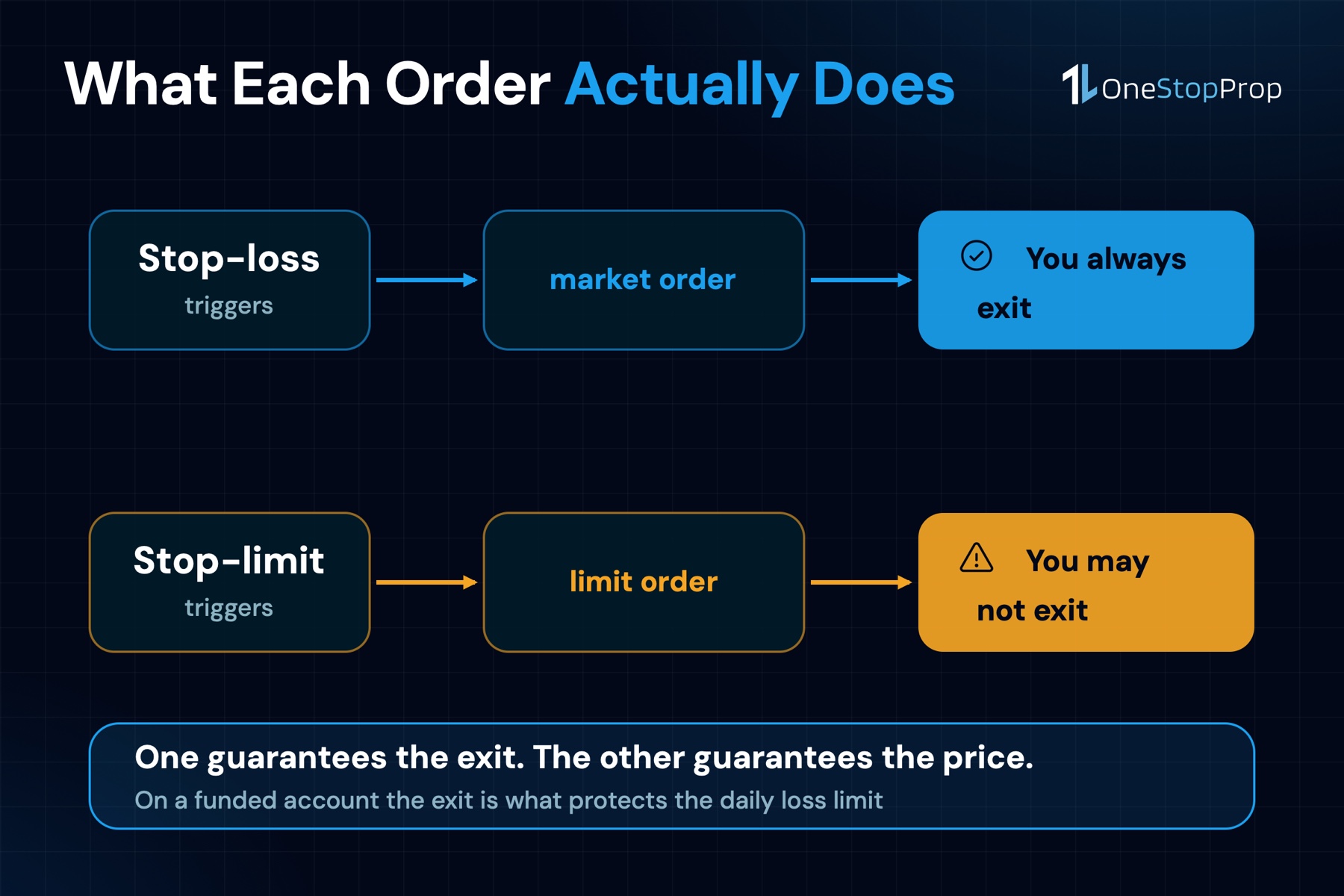
Every trader knows they need a stop. Far fewer understand that the type of stop they use can mean the difference between a controlled exit and a blown daily loss limit. The stop loss vs stop limit decision is not a preference, it decides whether you get out of the trade at all. Trading capital preservation depends on balancing execution certainty with price control. Stop-loss orders guarantee execution by converting to market orders when triggered, accepting slippage as the cost of certainty. Stop-limit orders guarantee a price by becoming limit orders after activation, risking no execution if markets move too fast.
That distinction, guaranteed exit versus guaranteed price, shapes every risk decision you make on a funded account. Choose the wrong order type in the wrong situation, and your protective mechanism fails exactly when the market pressure is highest.
This guide breaks down how each order actually works, what happens to both types during a gap, and which one belongs on which trade. The examples use real, recognizable stocks from the Magnificent 7, the same names available to trade at OneStopProp, where the daily loss limit structure makes order-type discipline non-negotiable.
Key Takeaways
- Execution certainty vs. price certainty: A stop-loss order guarantees you exit a position; a stop-limit order guarantees the price at which you exit, but not that you exit at all. If exiting at all costs is the priority, the stop-loss is the correct tool.
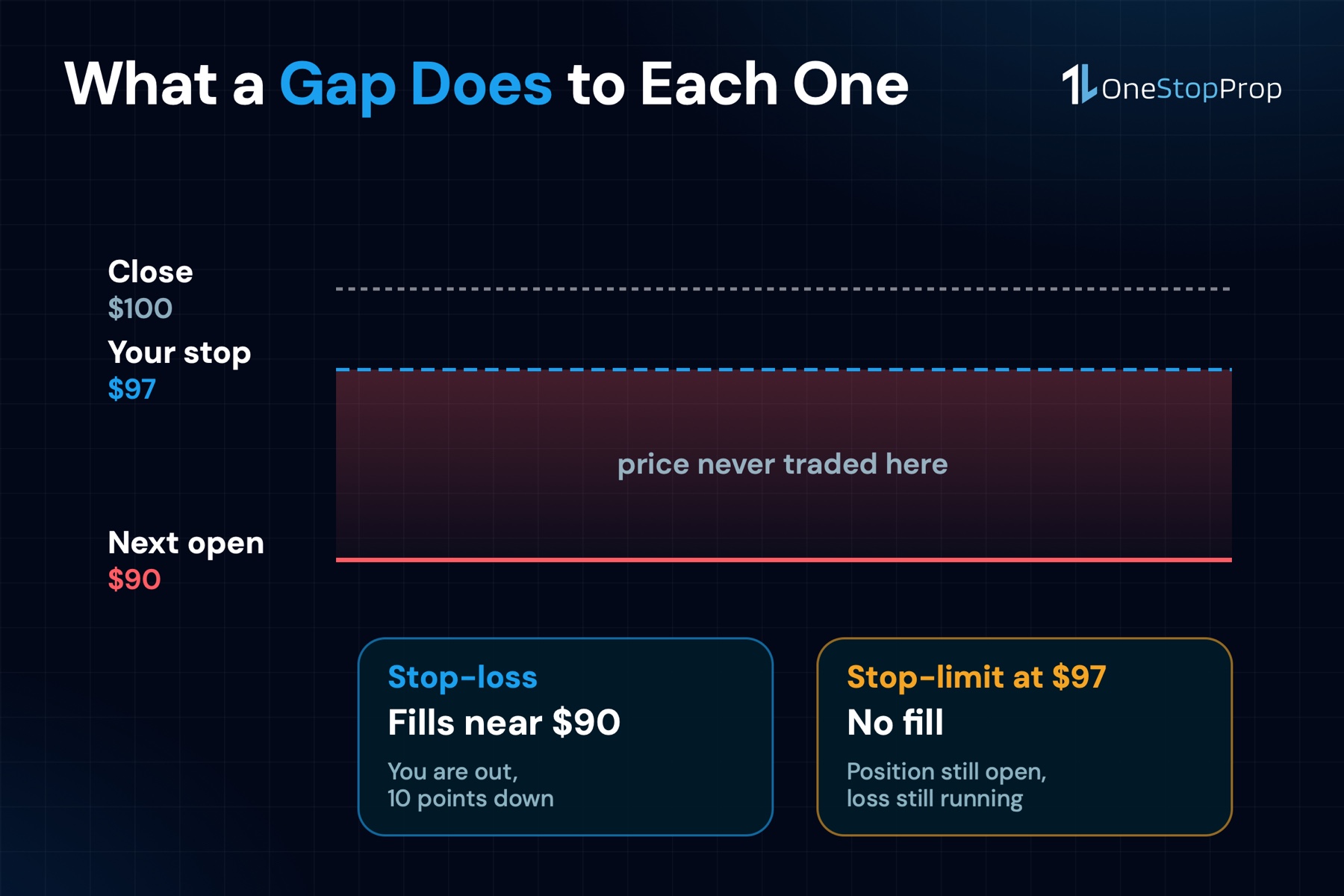
- Gap risk makes stop-limits dangerous on overnight holds: A stop is an instruction that becomes a market order when triggered, so on a gap-down it fills at the open price, not your stop price. If you set a stop at $97 and the stock opens at $90 on bad earnings, you fill around $90, your planned $3 risk becomes a $10 loss. The stop did not fail; the gap simply skipped over it. A stop-limit, by contrast, may not fill at all.
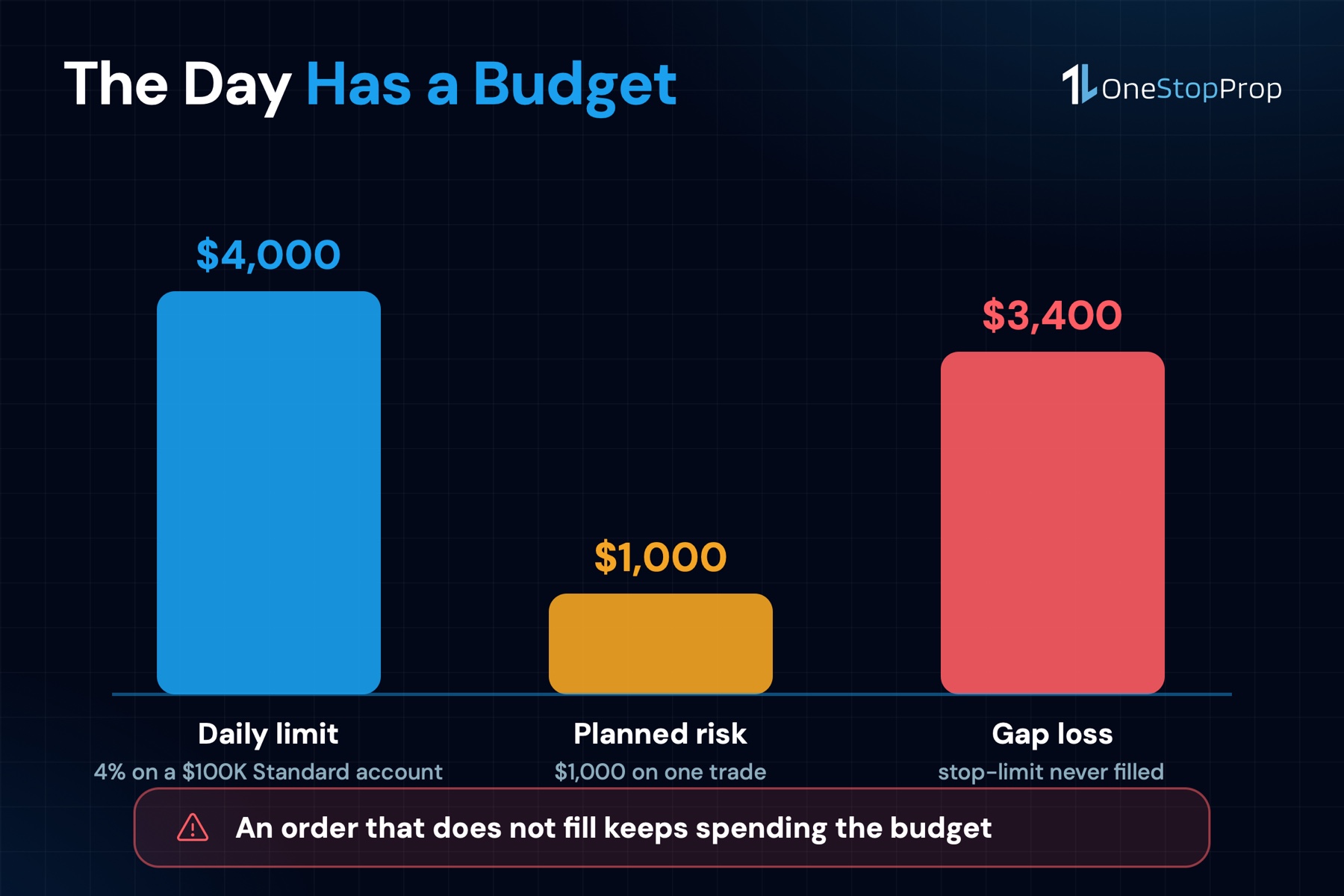
- Daily loss limits punish non-execution: On 2-Step Standard accounts at OneStopProp, the daily loss limit is 4%. A stop-limit that does not execute leaves your position open and your loss meter running, a slow burn toward a breach that a stop-loss would have cut short.
- Slippage is real but quantifiable: FXCM, a broker that publishes its own execution data, reports that 57.42% of stop and stop entry orders received negative slippage. The instrument there is forex rather than stocks, but the mechanic is identical: a stop becomes a market order, and a market order pays whatever price it finds. Accepting a small, known slippage cost on a stop-loss is nearly always preferable to an unlimited open loss from a stop-limit that failed to fill.
- Check what your platform actually offers: the OneStopProp Help Center lists market orders, limit orders, stop loss and take profit, and stop levels can be dragged on the chart once a position is open. Confirm stop-limit availability inside the platform before you build a strategy around it.
Quick-Start Prioritization Framework
| Scenario | Best Order Type | Reason | Time to Effect |
|---|---|---|---|
| Intraday trade, liquid stock (AAPL, NVDA) | Stop-loss | Execution certainty on fast-moving names | Immediate on trigger |
| Overnight hold, any stock | Stop-loss | Gap risk makes stop-limit unreliable | At market open if gapped |
| Swing entry on a breakout | Stop-limit | Avoids chasing an inflated price | Minutes |
| Thinly traded stock, wide spread | Stop-limit | Prevents catastrophic slippage fills | Seconds to minutes |
| Near daily loss limit threshold | Stop-loss | Guaranteed exit protects the account | Immediate on trigger |
| Earnings catalyst known in advance | Stop-loss (tighter size) | Gaps likely; execution must be certain | Immediate on trigger |
Start here if you are:
- A new funded trader: Default to stop-loss orders on every position until you understand your specific stock’s gap behavior. Guaranteed exit first, price optimization second.
- Holding the Magnificent 7 overnight: Tesla (TSLA) and NVIDIA (NVDA) are high-momentum, earnings-sensitive stocks that gap frequently. Stop-loss is almost always correct for overnight exposure to these names.
- An experienced swing trader in stable conditions: Stop-limit orders belong in your toolkit for managing entry price on breakouts and for stocks with wide bid-ask spreads during regular hours.
What a Stop-Loss Order Actually Does
The Mechanics: Trigger, Convert, Execute
A stop order sits dormant until the stock hits your trigger price, then springs into action. A stop-loss becomes a market order, almost always fills, price not guaranteed. That sequence is important to internalize. The moment your stop price is touched, the order transforms into a regular market order and joins the queue for the best available price at that instant.
With a stop-loss order, your stock will be sold at the best available price when triggered. This means that if the price dips dramatically when your loss amount is reached, you may end up with a bigger loss than your intended limit. The trade-off is simple: you trade price certainty for execution certainty.
In practice, on highly liquid stocks like Apple (AAPL) or Microsoft (MSFT) during regular market hours, this slippage is minimal. Research from Optimus Futures on price impact and slippage confirms that stop orders guarantee execution but may experience significant slippage during volatile periods. On a name like AAPL with millions of shares trading per minute, that slippage is typically pennies. On a smaller-cap name around a news event, it can be much larger.
A Real Stock Example: Tesla (TSLA)
You buy Tesla (TSLA) at $240.00 per share. You set a stop-loss at $230.00, giving yourself a $10.00 per-share risk. During normal trading hours, TSLA slides steadily to $230.00. Your stop triggers, converts to a market order, and you fill at $229.80. That is $0.20 of slippage, normal for Tesla in an active session. On the calmer names in the Magnificent 7, Apple (AAPL) or Microsoft (MSFT), the same order often slips a penny or 2. You exit, you know your loss, and your daily limit is still intact.
Pro Tip: On a funded account, the only job of a stop-loss is to limit the dollar amount that one trade can extract from your daily loss allowance. Set it before the trade opens, never after. The stop is not there to predict the chart, it is there to cap what a single bad trade can take out of a budget you only get once per day.
What a Stop-Limit Order Actually Does
The Mechanics: Trigger, Convert, Wait
A stop-limit order combines elements of both a stop order and a limit order. Like a stop-loss order, it begins as a trigger at a specified stop price. However, when triggered, it converts into a limit order instead of a market one. The investor sets both a stop price and a limit price, dictating the maximum or minimum price at which they are willing to buy or sell the security.
A stop-limit order combines price is reached but will only execute at the limit price or better. If the limit price cannot be met, the order may go unfilled, exposing the investor to further price movements.
That last sentence carries most of the risk. You chose a price floor. The market blew through it. You are still in the trade.
A Real Stock Example: NVIDIA (NVDA)
You hold NVIDIA (NVDA) at $140.00 per share. You place a stop-limit with a stop price of $133.00 and a limit price of $132.00, a $1.00 spread giving the order room to fill. NVDA eases down to $133.00, the stop triggers, a limit order at $132.00 enters the market, and fills at $132.40. You exit cleanly, slippage avoided.
This is the stop-limit working perfectly, during a gradual, liquid decline. A stop-limit order during a gradual decline executes within the limit range. But on a gap down from $140 to $130, a stop-limit may simply not execute. The stock opens below your limit price. Your order sits on the book unfilled. Your loss continues to grow every minute you hold the position.
Pro Tip: Always set your stop-limit’s limit price slightly below the stop price, not at the same level. If stop and limit are identical (e.g., both at $133.00), any gap or rapid slippage past that price leaves the order permanently unexecuted. A $0.50 to $1.00 spread on stocks gives the order realistic room to fill during fast moves, without creating a limitless exposure.
The Gap Problem: What Happens When the Market Jumps
Why Gaps Expose Both Order Types
These sudden jumps are known as gaps, and the risk they create is called gap risk. Gap risk is one of the most underestimated dangers in trading and investing. It appears most often overnight, during earnings releases, or around major news events.
The Magnificent 7 stocks, Apple (AAPL), NVIDIA (NVDA), Microsoft (MSFT), Amazon (AMZN), Alphabet/Google (GOOGL), Meta (META), and Tesla (TSLA), are among the most gap-prone stocks in the market. Each one reports quarterly earnings after the close, which is exactly when the market is shut and your stop cannot do anything for you.
Put a number on it. A $10,000 position in NVDA that gaps down 7% is a $700 loss before you can touch anything, nearly 70% of the daily allowance on a $25,000 Standard account.
Stop-Loss During a Gap: Bad Fill, But You Exit
Stop orders convert to market orders when your stop price is triggered. In gap scenarios, this means guaranteed execution but potentially significant slippage from your intended price.
Here is what that looks like on a real trade. You hold Meta (META) into earnings at $650 per share. Your stop-loss is set at $630.00, a $20 risk. Meta misses earnings guidance after the close. It opens the next morning at $610.00. Your $630 stop triggers instantly at the open. You fill at $609.50. Your planned $20 risk became a $40.50 actual loss, twice what you expected. But the position is closed. Your daily loss meter stops. You retain most of your daily allowance and can manage the rest of your session.
Stop-Limit During a Gap: Clean Price, No Exit
A stop-limit may not fill if price gaps past the limit. A stock can gap, jump from one price to a very different one without trading in between, often overnight or on news. A $45 stop-loss can fill well below $45 if the stock opens at $40. A stop-limit avoids the bad fill but may not execute at all.
Using the same Meta example: your stop is at $630, your limit is $629. META opens at $610. Your stop-limit triggers into a limit order at $629. No shares trade at $629 or above. Your order sits in the queue unfilled. META drifts lower to $600 during the session. Your limit order eventually expires or is canceled. You now have a $50 per-share loss instead of $40.50, and your daily limit may be in jeopardy.
Pro Tip: If you know an earnings report is due after the close, consider one of 3 options before the announcement: reduce position size by 50%, exit before the report entirely, or ensure your stop is a stop-loss rather than a stop-limit. The logic behind all 3 is the same: a gap can turn a $0.50 stop into a $3 loss, and the only variable you control before the bell rings is how many shares that happens to.
Market Order vs. Limit Order: The Foundation You Need First
Before choosing between stop-loss and stop-limit, it helps to understand the underlying order types they build on.
Market Orders: Speed Over Price
Stop orders, also known as stop-loss orders, are designed to trigger a market order once the stock reaches a predetermined stop price. Unlike limit orders, stop orders do not specify a price for execution; instead, they turn into market orders when the stop price is hit.
A plain market order executes immediately at whatever the current best price is. On AAPL trading 50 million shares a day, that market order will fill within a fraction of a second at or extremely near the quoted price. In thin conditions or volatile gaps, the “best available price” can be far worse than expected.
Limit Orders: Price Over Speed
A limit order instructs the broker to fill only at your specified price or better. You keep price control, but if the market moves away without filling you, your order sits inactive. A stop-loss order automatically triggers a market order to minimize losses when the stock price falls to a certain level, ensuring execution. In contrast, a stop-limit order activates a limit order at the stop price, allowing for more control over the execution price but introducing the risk of not being filled.
The practical implication: use limit-based orders when price matters more than speed. Use market-based orders (stop-loss) when exiting matters more than the exit price.
How Stop Orders Interact with the Daily Loss Limit
The Funded Account Context
Risk management rules in funded accounts are restrictions set by prop firms to limit trader losses. These typically include maximum daily loss, total drawdown limits, and consistency requirements.
At OneStopProp, the max daily loss is a fixed percentage of the initial account balance, and the percentage depends on the path you buy: 4% on Standard 1-Step, Standard 2-Step and Pro 2-Step, 3% on Pro 1-Step, and 2% on both Instant accounts. The calculation is the same on all of them: upon the 12:00 AM EST day change, OneStopProp takes the higher figure of either the account balance or account equity and subtracts that fixed percentage of the initial balance from the higher value as the daily loss limit for the new day.
On a $100,000 Standard 2-Step account, that puts your daily loss ceiling at $4,000. On a $100,000 Instant account it is $2,000, half the room for the same mistake. Every dollar your open positions bleed past your stop adds to that meter.
Why a Stop-Limit Failure Is Worse Than Stop-Loss Slippage
A funded trader who treats a daily loss limit as a distant ceiling rather than a live constraint invites trouble. For example, 2 oversized trades without properly placed stops can stack losses quickly. Once that limit is breached, the funding is typically gone within hours. Therefore, the safer approach works backward from the limit itself.
Consider 2 traders on a $50,000 account, each with a $2,000 daily limit (4%). Trader A uses a stop-loss on NVIDIA (NVDA) and suffers $200 in slippage on a gap. Total loss: $700 on the trade. Trader B uses a stop-limit, which does not fill. NVDA drifts $500 below the limit price before Trader B manually closes. Total loss: $1,100 on the same trade. Trader B’s “price control” cost $400 more.
Run the arithmetic against the limit itself. On a 4% daily loss limit, risking 1% per trade leaves room for 4 consecutive losers before the limit is gone; at 0.5% per trade, 8. On an Instant account, where the limit is 2%, those same numbers are 2 and 4. That is the real reason most funded traders cap risk at 0.5% to 1% per trade. A stop-limit that fails extends a losing trade’s duration, burns more of that budget, and leaves fewer trades in the day to recover.
Pros, Cons, and When to Use Each
Stop-Loss Orders
Pros:
- Guaranteed execution once the stop price is reached during market hours
- Simple, single-price setup with no gap between trigger and limit
- Prevents runaway losses during news events and earnings gaps
- Protects the daily loss limit by cutting losing positions automatically
- Works correctly on every liquid stock including Apple (AAPL), NVIDIA (NVDA), Microsoft (MSFT), and the full Magnificent 7
Cons:
- No price guarantee on the fill, slippage is accepted as a cost
- Gap-down events can cause fills significantly below the stop price
- In extreme volatility, the market order fills at whatever price the book offers
Stop-Limit Orders
Pros:
- Price certainty: you will not fill at a price worse than your limit
- Useful for entering breakouts without overpaying on fast moves
- Can prevent filling at temporarily distorted prices on illiquid stocks
Cons:
- Zero execution guarantee if the stock gaps past the limit price
- A position that does not exit during a gap continues to lose value
- Requires active monitoring; an unfilled stop-limit needs a manual decision
- Dangerous for funded accounts where an open losing position burns the daily limit
Pro Tip: Experienced traders sometimes run both: a stop-limit as the primary exit for gradual declines, with a wider stop-loss underneath as a disaster backstop. In theory it gives price control in calm markets and execution certainty in violent ones. In practice it only works on a platform that offers both order types. The OneStopProp Help Center lists market orders, limit orders, stop loss and take profit, so confirm inside the platform before you build a strategy that depends on a stop-limit existing.
Common Mistakes That Cost Funded Traders
Setting Stop and Limit at the Same Price
The most common stop-limit error is setting both prices identically, for example, stop at $133.00 and limit at $133.00. During any fast move or gap, there will be no available bids at exactly $133.00. The order never fills. Add a buffer: if your stop is $133.00, set your limit at $132.25 or lower, giving the market room to fill within your range.
Using a Stop-Limit the Night Before Earnings
A stop-loss order is appropriate if bad news comes out about a company that casts doubt upon its long-term future. In that case, the stock price may not return to its current level for months or years, and investors would be wise to cut their losses and take the market price. A stop-limit order may yield a considerably larger loss if it does not execute.
Any position in Amazon (AMZN), Alphabet (GOOGL), or Meta (META) held through an earnings announcement is exposed to a 5% to 15%+ gap. Stop-limits on these positions are not protection. They are a false sense of security.
Ignoring Floating Losses in Daily Drawdown Calculations
On a $100,000 OneStopProp account if at 12:00 AM EST you have an open trade with a floating profit of $2,000, your account equity will be $102,000. With a 4% daily drawdown, the equity cannot drop below $98,000 on the next trading day. This means even unrealized gains create a higher floor to protect. A stop-limit that does not execute means a floating loss compounds against a tightening daily limit, a double pressure the platform monitors in real time.
Match-Trader’s platform provides real-time monitoring of the max daily loss limit, including a countdown timer that indicates when the daily loss limit resets. If breached, the account will fail the challenge.
Frequently Asked Questions
What is the main difference between a stop-loss and a stop-limit order?
The critical difference between stop-limit orders and stop-loss orders is how they execute once triggered. Stop-loss orders become market orders, executing at the next available price, while stop-limit orders become limit orders, executing at a specified price or better. The practical result is that a stop-loss exits the position no matter what, while a stop-limit may not execute if the stock moves too quickly.
Which order type is better for a funded account?
For funded account traders with a daily loss limit to protect, a stop-loss order is almost always the safer default. If your primary goal is to always be protected and always exit at your stop level, use a stop-loss order and accept the slippage risk. If you would rather hold through a gap and wait for a recovery, use a stop-limit order and accept the non-execution risk. On a funded account, non-execution means an open loss continues to burn your daily budget.
Does a stop-loss guarantee I won’t lose more than planned?
No. A stop-loss guarantees that an order will be sent to the market once the trigger price is reached, but it does not guarantee the execution price. Due to slippage and gaps, you can lose significantly more than the distance between your entry and stop price, especially in volatile or illiquid markets. The stop guarantees the attempt, not the level. Account for this by sizing positions conservatively so that even a gapped-out stop stays inside the daily loss limit.
How does Match-Trader handle stop orders on funded accounts?
The OneStopProp Help Center lists 4 order types on the platform: market, limit, stop loss and take profit. Stop-loss levels are set when you enter the order and are monitored in real time alongside the account’s daily loss limit. Traders can adjust stop levels by dragging directly on the chart after the position is open.
What happens to my stop-limit order if a stock gaps down past my limit price overnight?
Stop-loss orders only activate when markets are open and trading. If price gaps beyond the stop level, execution happens at the next available price, not the intended one. For a stop-limit order, the situation is different: the stop triggers, a limit order is placed, but since the current price is already below the limit price, that limit order may sit in the market unfilled indefinitely, or until you manually cancel it and place a new order at the current market price. The position remains open and exposed throughout.
What is the correct stop placement strategy relative to the daily loss limit?
Set a personal daily stop that sits well below the firm’s official limit. Most experienced funded traders stop themselves at roughly half of the allowed daily loss. This creates a private buffer and prevents 1 catastrophic session from ending the account. On a $100,000 account with a 4% daily limit ($4,000), aiming to stop all trading at a $2,000 daily loss keeps you inside the rule even if 1 further trade goes wrong after you hit your personal limit.
The Bottom Line: Which Order Protects a Funded Account?
The honest answer is that both order types have legitimate uses. A stop-limit order is a precise tool for specific conditions, gradual declines in liquid markets, breakout entries where price discipline matters, and stocks with wide spreads during calm sessions.
For funded traders, particularly those trading high-momentum stocks like Apple (AAPL), NVIDIA (NVDA), Tesla (TSLA), and the rest of the Magnificent 7, the stop-loss order is the default choice for 1 simple reason: execution certainty preserves the daily loss limit. A $200 slippage event is recoverable. A stop-limit that does not execute on a gap, leaving a $1,500 floating loss that chews through your daily allowance, is a different category of problem.
The traders who struggle most with this choice tend to be the ones who discovered stop-limits, fell in love with the idea of price control, and applied them everywhere. The gap that eventually catches them is usually on a name they least expected, earnings season on Amazon (AMZN) or a macro shock opening that drops NVIDIA (NVDA) 8% before the first trade clears.
The framework is straightforward: stop-losses for protection, stop-limits for precision. Know which one you are using and why, before the market opens.
If you are ready to put this into practice on real, recognizable stocks with clearly defined risk rules, OneStopProp’s Standard 2-Step account runs the exact structure these examples use: a 4% daily loss limit measured off the initial balance, a 90% profit split, and positions you can hold overnight.
Sources
- Stop-Loss vs Stop-Limit Orders, SmartAsset. Overview of how each order type functions and executes. https://smartasset.com/financial-advisor/stop-loss-vs-stop-limit
- Stop-Loss Order vs Stop-Limit Order, Saxo Bank. Execution mechanics and control trade-offs explained. https://www.home.saxo/learn/guides/trading-strategies/what-is-a-stop-loss-order
- Stop-Limit Order: What it is in Stocks, Moomoo. Step-by-step mechanics with gap risk examples. https://www.moomoo.com/us/learn/detail-stop-limit-order-117551-241084097
- Stop-Limit Order Definition, Investing.com Academy. Key differences in execution between stop-loss and stop-limit. https://www.investing.com/academy/trading/stop-limit-order-definition/
- Match-Trader Platform Features, Fair Trading Technology. Order types supported including market, limit, and stop orders. https://www.fairtradingtech.com/platforms/match-trader
- Understanding Gap Risk, HeyGoTrade. Why stop-losses fail during gaps and overnight risk management. https://www.heygotrade.com/en/blog/understanding-gap-risk/
- Managing Orders Around Market Gaps, Optimus Futures. Stop and stop-limit behavior during gap events explained. https://learn.optimusfutures.com/gap-trading-orders
- What is the Maximum Daily Loss?, OneStopProp. Official daily loss calculation methodology for all account types. https://help.onestopprop.com/faq/what-is-the-maximum-daily-loss/
- Platform Guide, OneStopProp Help Center. Real-time daily loss monitoring and threshold mechanics on Match-Trader. https://help.onestopprop.com/faq/platform-guide/
- Slippage Statistics, FXCM. Share of stop and stop entry orders that received negative slippage. https://www.fxcm.com/markets/execution/slippage-statistics/
- Which Order to Use: Stop-Loss or Stop-Limit Orders, Investopedia. When cutting the loss at market price is the right call. https://www.investopedia.com/articles/active-trading/091813/which-order-use-stoploss-or-stoplimit-orders.asp
- Gap Trading: Overnight Price Gaps, VT Markets. Gap size statistics including S&P 500 fill probability data. https://www.vtmarkets.com/discover/gap-trading-overnight-price-gaps-in-shares-indices/